
EControl Syntax Editor SDK3.00 - Download
You'll be able to download in few seconds.
Publisher Description
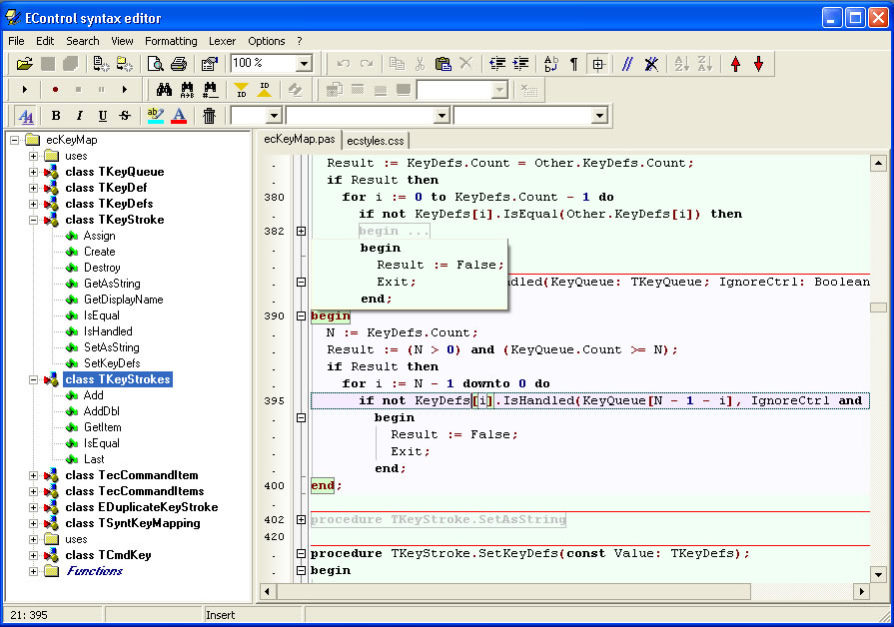
Powerful text editor control with syntax highlighting.
This editor is built using EControl Syntax Editor SDK.
The unique and more important feature is 100% customizable lexer, so you can adjust it for any type of text file. Lexer uses standard VCL resource streaming and stores itself in DFM text format.
Features:
- Delphi 2007 like editor
- Fast working even with huge files (several megabytes)
- Localized: English, Russian, German
- Customizable text folding
- Customizable text structure tree view
- Customizable keymapping
- 100% customizable lexer (syntactical analyzer). Comfortable visual lexer editor
- Nested lexers highlighting.Combining several lexers in one
- Spell checking
- Code templates
- Auto-correction
- Auto-completion pop-up
- Print/ print preview
- Powerful search/replace (regular expressions, search all ...)
- Incremental search
- Export in HTML/RTF
- Copy selection to clipboard in RTF
- Block staples (hierarchical text representation)
- User ranges allows custom lexer independent highlighting and text folding
- Stack-based markers
- Unlimited bookmarks
- Animation
- Normal, column-oriented and line selection, clipboard operations
- Right margin, persistent blocks, keep caret in text and numerous other options
- Smart tags
- Horizontal ruler
- User formatting
Highlighting features:
- Highlighting styles can use any font
- Text region borders (borders is a part of the style)
- Hiding parts of the text using Hidden attribute of the style
- Multilevel style merging
- Dynamical highlighting depended on caret position. Highlights valid blocks (for example, current procedure, brackets, "begin" ... "end" blocks ...)
- Line highlighting
- Text partition by means of line separators like in Visual Basic IDE
- Hyperlinks highlighting
Default Lexer Library contains lexers for file types (over 30): C++, Pascal, Basic, SQL, Delphi Resources, HTML, XML, Style sheets, Ini files, Help Contents, Batch files, PHP...
About EControl Syntax Editor SDK
This Components & Libraries program is available in English. It was last updated on 29 September, 2026. EControl Syntax Editor SDK is compatible with the following operating systems: Linux, Other, Windows.
The company that develops EControl Syntax Editor SDK is EControl Ltd.. The latest version released by its developer is 3.00.
The download we have available for EControl Syntax Editor SDK has a file size of 7.3 MB. Just click the green Download button above to start the downloading process. The program is listed on our website since 2011-10-15 and was downloaded 0 times. We have already checked if the download link is safe, however for your own protection we recommend that you scan the downloaded software with your antivirus. Your antivirus may detect the EControl Syntax Editor SDK as malware if the download link is broken.
How to install EControl Syntax Editor SDK on your Windows device:
- Click on the Download button on our website. This will start the download from the website of the developer.
- Once the EControl Syntax Editor SDK is downloaded click on it to start the setup process (assuming you are on a desktop computer).
- When the installation is finished you should be able to see and run the program.
Program Details
System requirements
Download information
Pricing
Version History
version 3.00
posted on 2011-10-15
-
Disclaimer
External Download
We do not host EControl Syntax Editor SDK on our servers. We did not scan it for viruses, adware, spyware or other type of malware. This app is hosted by the software publisher and passed their terms and conditions to be listed there. We recommend caution when installing it.
The external download link for EControl Syntax Editor SDK is provided to you by apps112.com without any warranties, representations or guarantees of any kind, so access it at your own risk.
If you have questions regarding this particular app contact the publisher directly. For questions about the functionalities of apps112.com contact us.
